
|
|||
|


 |
|

 |
|

| Home |
| About |
| Hobbies |
| Software |
| Hardware |
| ICT Hotlist |
| Purpose |
React:


-2005- Ok.ru !!link!! — Alt For Norge
 Back to the ICT-Hotlist...
How to retrieve your FTP passwords from FileZilla
You probably once got an e-mail with the FTP settings for a download site, entered the credentials in FileZilla, lost the mail and now someone else needs the FTP account. Or you got a new PC assigned and suddenly need to FTP a bug report, noticing your sites and passwords are not transferred to the new PC. Of course you can contact your ftp partner, fill out a few forms, send them in and wait a few days whilst your boss gets angry behind your back when the sales system grinds to a halt.As you by now know from reading all the other tips, they do not work as FileZilla now encrypts the password in the configuration file.
These are the steps to get your password with the current versions of FileZilla.
- Open the file explorer and paste the path %AppData%/filezilla in the address bar and open the file sitemanager.xml in Notepad or your favorite text editor (NotePad++)
- Search for the section containing the ftp site. See for an example the next text box.
<Server>
<Host>ftp.van_Soest.it</Host>
<Port>21</Port>
<Protocol>0</Protocol>
<Type>0</Type>
<User>Johan</User>
<Pass encoding="base64">VGhpc0lzQVRlc3RQYXNzd29yZA==</Pass>
<Logontype>1</Logontype>
<TimezoneOffset>0</TimezoneOffset>
<PasvMode>MODE_DEFAULT</PasvMode>
<MaximumMultipleConnections>0</MaximumMultipleConnections>
<EncodingType>Auto</EncodingType>
<BypassProxy>0</BypassProxy>
<Name>ftp://ftp.van_Soest.it</Name>
<Comments />
<LocalDir />
<RemoteDir />
<SyncBrowsing>0</SyncBrowsing>
<DirectoryComparison>0</DirectoryComparison>ftp://ftp.van_Soest.it
</Server>
An example of a FileZilla server configuration. - You now can find the password in the line.
<Pass encoding="base64">VGhpc0lzQVRlc3RQYXNzd29yZA==</Pass>Notice the encoding type "base64". This explains the encoding type used to encrypt the password.
- Now open your favorite base64 decoding program. Every postmaster has one.
|
Use your favorite local base64 decoding program. This program keeps all data within the company walls and can do much more than the online variant demonstrated here.
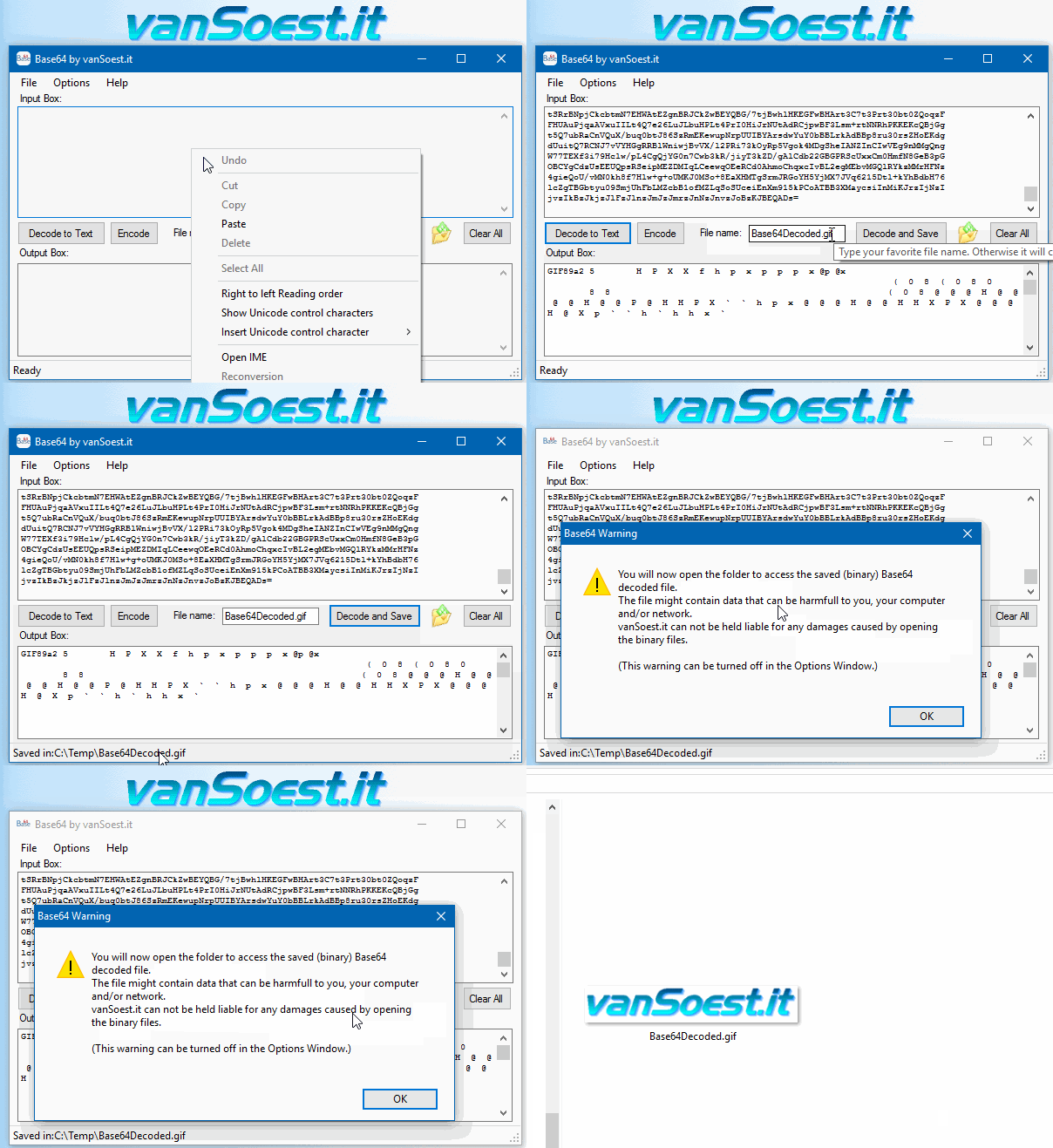 Copy everything between <Pass encoding = "base64"> and </Pass> into the text box. Now click on the "Decode to Text" button and the Output box will show your FileZilla password in plain text. |
-2005- Ok.ru !!link!! — Alt For Norge7.5/10 – A pioneering, if modest, attempt to bridge Nordic and Russian digital identities. Worth revisiting as a case study in the history of internet culture. This review is speculative and based on historical analysis of digital trends, cultural exchanges, and the platforms of the 2000s. For a definitive account, additional source material would be required. I should also consider possible inaccuracies if I'm assuming the wrong meaning. Maybe "Alt for norge" was a specific viral campaign or a niche project. But without concrete info, I have to build a plausible scenario. I need to structure the review. Start with an introduction about ok.ru, then discuss what "Alt for norge" could have been, the cultural context between Norway and Russia at that time, the user community's reaction, and the legacy of such projects. Also, highlight any challenges, like language barriers or cultural differences affecting the project's reach. alt for norge -2005- ok.ru Including technical aspects of ok.ru in 2005 would add depth. For example, the platform's features then, user interaction rates, and how Norwegian content was received. Comparing it to other cultural projects on similar platforms could provide a broader view. This speculative review examines the historical and cultural significance of such a project, assuming it aimed to foster connections between Norwegians and Russian speakers or Russian communities via digital platforms. Given the limited availability of direct sources, this analysis blends historical context, platform-specific insights, and the broader cultural landscape of 2005. In 2005, the internet was in its early stages of mass globalization. Social media platforms were still emerging, with MySpace , YouTube (founded in 2005), and Facebook (launched in early 2004 for Harvard students) dominating Western discourse. In Russia, OK.RU would not launch until the following year, but LiveJournal (founded in 1999) and forums were key hubs for cross-cultural exchange. For a definitive account, additional source material would Finally, wrap it up by summarizing the potential impact and the role of such projects in fostering cultural exchange, even if they were short-lived or not widely recognized. Wait, the user might be looking for a critique of the content itself, whether it was a website, a campaign, or an event. Since I don't have firsthand experience of it, I should frame the review as a hypothetical analysis based on what could have been, using historical and cultural context. But without concrete info, I have to build Also, considering the time frame, 2005, the internet landscape was different. Social media wasn't as prevalent as now, so "ok.ru" would have been one of the main platforms. I should mention how Russian social media platforms were used back then and how Norway's presence there might have been limited but still significant in some ways. |

Scripts and programming examples disclaimer
Unless stated otherwise, the script sources and programming examples provided are copyrighted freeware. You may modify them, as long as a reference to the original code and hyperlink to the source page is included in the modified code and documentation. However, it is not allowed to publish (copies of) scripts and programming examples on your own site, blog, vlog, or distribute them on paper or any other medium, without prior written consent.Many of the techniques used in these scripts, including but not limited to modifying the registry or system files and settings, impose a risk of rendering the Operating System inoperable and loss of data. Make sure you have verified full backups and the associated restore software available before running any script or programming example. Use these scripts and programming examples entirely at your own risk. All liability claims against the author in relation to material or non-material losses caused by the use, misuse or non-use of the information provided, or the use of incorrect or incomplete information, are excluded. All content is subject to change and provided without obligation.